How We Rebuilt the Order Intake for a Building Supply Distributor
- Ed Hitchcock

- Apr 7
- 7 min read
Updated: Apr 9
By Ed Hitchcock, Enterprise AI Systems Architect, SupplyTech Solutions
Most operational problems don't announce themselves as architecture problems. They show up as overtime, as tribal knowledge walking out the door when someone quits, as a customer service team that spends half its week keying data that already exists somewhere else in a slightly different format. That’s where we found ourselves when we engaged a mid-market building supply distributor whose purchase order upload process had never been questioned because it had always worked, more or less.
Twenty minutes per order intake. Every one of them. Manually keyed, manually corrected, manually monitored downstream. The math compounds fast.
The Process That Nobody Had Questioned
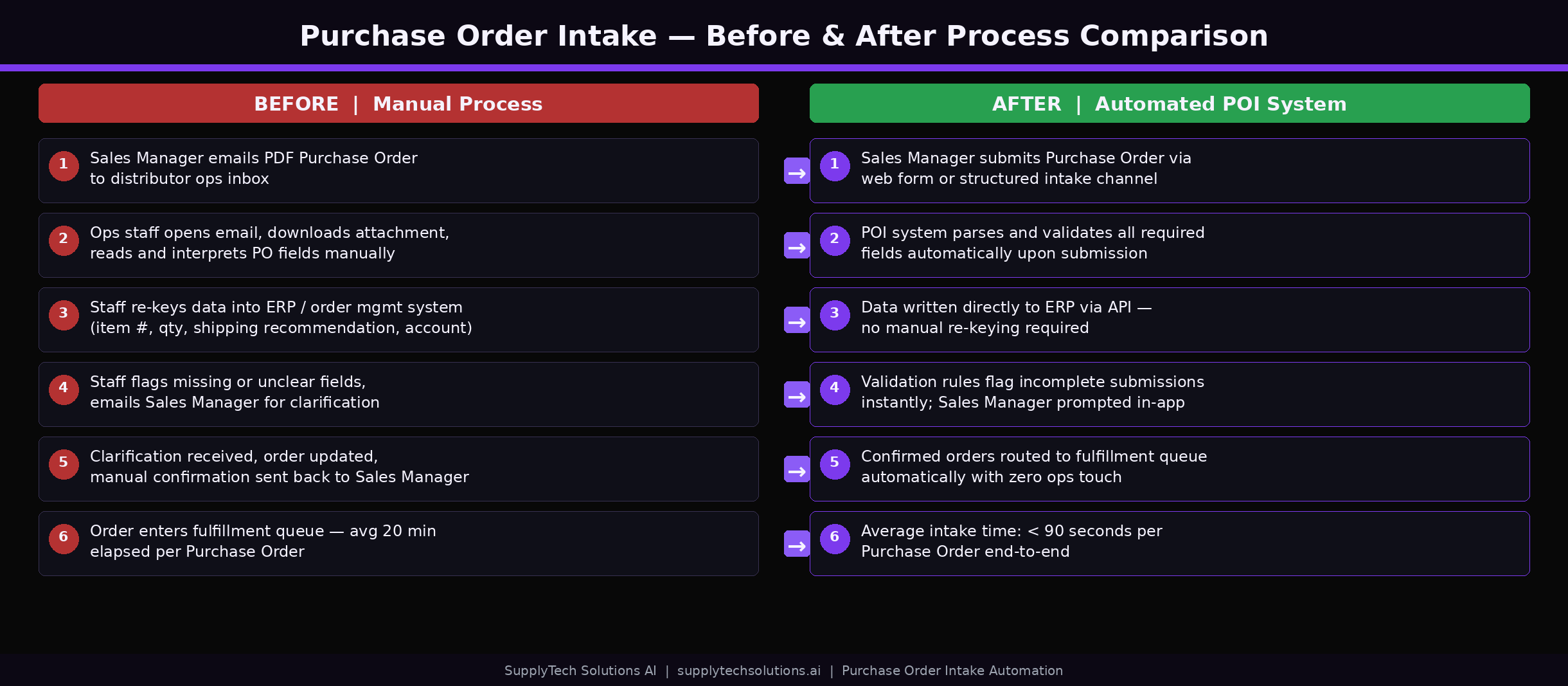
Sales Managers at this firm completed manufacturer-specific Excel files for every large dealer purchase order: dealer info, ship dates, PO numbers, item quantities. Those files went to Customer Service via email. From there, Customer Service keyed every order into the legacy ERP by hand.
That sounds manageable until you understand what "by hand" actually meant here. It wasn't just entering the data from the spreadsheet. It was correcting defaulted fields one at a time: ship date, order source, payment terms, shipping method, shipping terms. It was also navigating a live dynamic routing screen that depends on real-time shipment data. It was then entering every line item individually.
And then there was the downstream problem. Purchase orders are often future-dated. When they were entered as open orders, the ERP treated them like active orders and committed inventory immediately. That meant warehouse staff had to intervene later, manually deallocating inventory or pushing items to backorder when the actual ship window arrived. The Customer Service team’s manual work created a second layer of manual work further down the chain.
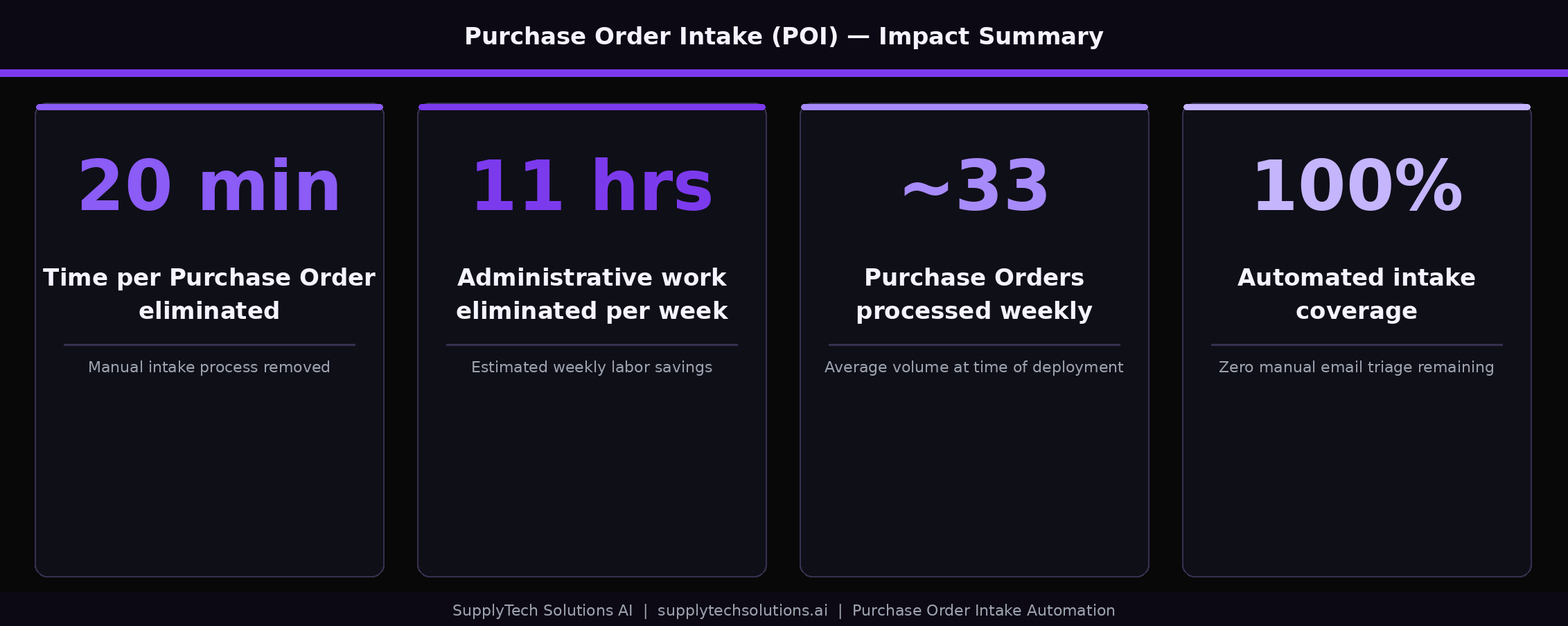
Twenty minutes per order, multiplied across the volume of purchase orders this firm processes, produced an estimated 11 hours of administrative labor from customer service per week. And that number doesn’t account for the error corrections, the email threads asking "what did you mean by this field," or the institutional knowledge required to do any of it correctly. This was a process that could only function because experienced people had memorized its quirks.
The Wrong Answer We Almost Built
The initial project framing was straightforward: automate the open-order entry process. That’s where most teams start, and it’s a reasonable instinct. The data exists. The target system is known. Just build a mechanism to move one to the other.
We started digging into the ERP architecture to understand how that automation would actually work. What we found changed the entire direction of the engagement.
The routing system is not a passive step in the open-order creation workflow. It sits in the middle of the process and pulls live route and shipment data to make its assignments. You cannot cleanly bulk upload into open orders from an external static tool because routing system needs dynamic context that doesn’t exist until shipments are already in the system. A static file, no matter how well-structured, cannot satisfy what routing system is asking for at the point in the workflow when it asks.
The standard workaround for this kind of blocker is custom ERP code. Modify the system to accommodate the new process. We decided not to do that. The ERP is a legacy system written in an older programming language, a language that most modern developers don’t touch. Custom modifications are slow to build, expensive to maintain, and brittle in ways that reveal themselves at the worst possible moments. So we stopped trying to fit the automation into the open-order workflow. We looked for a different structural target inside the ERP.
The Insight That Reframed Everything
The ERP has a holding structure called Future Orders. Orders entered as Future Orders don’t commit inventory and don’t require routing at the point of entry. They sit in the system until a configurable release window triggers their conversion to open orders, at which point routing system does its job with live data the way it was designed to. The routing intelligence the ERP was built around isn’t bypassed; it’s preserved. We’re just inserting a structured intake layer upstream of the point where it activates.
This reframe changed what we were building from a direct-to-ERP automation to a controlled batch processing layer that hands off to the ERP’s native workflow rather than trying to replace it. Future Orders was already there. We weren’t asking the ERP to do something new; we were using an existing mechanism that the purchasing order process had never been designed around.
That insight unlocked the whole architecture.
What We Built: The Purchase Order Intake Tool
The Purchase Order Intake tool, which we call POI, is a controlled batch processing system built entirely on Microsoft’s Power Platform and Fabric stack. No custom ERP code. No new integrations into routing system. Here’s how the stack breaks down:
Power Apps front end — a lightweight internal UI for file upload, batch status monitoring, and output download. Operationally simple by design; no custom-coded application in v1.
SharePoint — acts as the front door for file intake and the output library for processed files.
Power Automate — the orchestration layer that manages file movement, triggers processing, and updates batch status throughout the workflow.
Microsoft Fabric Data Warehouse — the core processing environment. Staging tables, normalization logic, validation rules, shipping recommendation engine, and Future Orders output mapping all live here in SQL.
Dataflow Gen2 — handles data movement between SharePoint and Fabric in both directions.
The operational flow is straightforward. A user uploads a purchase order CSV or Excel file into the Power App. Power Automate picks it up and moves it into Fabric. SQL logic validates every field, normalizes the data to a single consistent structure regardless of which manufacturer’s Excel template it originated from, applies initial Ship Via recommendations based on full-order logic, flags exceptions for manual review, and outputs a Future Orders upload file. Customer Service audits the file. Customer Service bulk uploads it into the ERP.
That’s the whole process. No new screens in the ERP. No new logins. No new training burden beyond learning to use a simple upload interface.

The Shipping Recommendation Layer
One component worth explaining in more detail is the Ship Via logic, because it’s where a lot of the manual guesswork used to live.
In the old process, Customer Service made shipping determinations on partial information, often looking at individual line items and making an initial guess before the full order picture was assembled. BOI evaluates the complete order: total quantities, weight constraints, shipment characteristics across all line items. If a given shipping method can’t reasonably accommodate a full order based on those characteristics, that method is eliminated from consideration before a human ever looks at the file.
This recommendation is not final routing truth. Route Manager still makes the authoritative routing decision downstream using live shipment data, as it was designed to. What POI does is give Customer Service a defensible starting point instead of an educated guess. The audit becomes a review of a reasoned recommendation rather than a blank-slate decision made on partial data.
What We Chose Not to Build
Some of the most important decisions we made on this project were about scope exclusions. In v1, we deliberately kept out the following:
No direct routing system integration
No direct writeback into open orders
No concurrency, queueing, or live API integration with the ERP
One active batch at a time, by design
Manual Customer Service audit required before any ERP upload
These aren’t limitations we plan to revisit in v2. They’re a philosophy. The temptation in process automation projects is to automate everything simultaneously and declare success based on the percentage of human steps removed. That’s the wrong measure when you’re working in a legacy ERP environment where the audit responsibility belongs to a team that knows things the system doesn’t.
Customer Service owns the purchase order process. POI reduces their burden by handling everything that is purely mechanical: field normalization, structure mapping, format standardization, shipping logic. It keeps humans in the loop for everything that requires judgment: exceptions, edge cases, final upload approval. The goal in v1 was to eliminate the work that should never have required human attention, not to replace the humans who bring actual operational context to the process.
The Results
The numbers are straightforward.
An estimated 11 hours of administrative work eliminated per week. A 20-minute-per-purchase-order manual process now handled by the system before Customer Service ever opens a file. Zero custom ERP modifications to the legacy ERP.
The downstream effects matter too. Future Orders are clean. Inventory isn’t committed prematurely. Warehouse staff don’t receive orders they have to manually deallocate. The purchase-order workflow no longer generates a secondary cleanup workflow.
And the architecture is ERP-agnostic. When this firm eventually upgrades to a more modern ERP, the intake layer doesn’t need to be rebuilt. The Power Platform infrastructure, the Fabric data warehouse, the normalization logic and SQL validation rules move with the business. The only component that changes is the output format of the upload file and the target ERP connection. The intelligence layer survives the migration.
The Operational Reality
POI is not a finished system. It’s an intentional v1 that proved the core value proposition: if you validate and normalize purchase order data upstream, the downstream ERP work becomes trivial. The Future Orders upload takes Customer Service minutes instead of 20 minutes per order. The inventory problems disappear because orders are no longer entering the open-order pipeline prematurely. The workflow is controlled, auditable, and testable.
What the system also proved is that the Power Platform and Fabric stack can carry a production workload in a mid-market operations environment without custom development overhead. Every component is configurable. Every rule is in SQL. Every process is visible and auditable by the team that owns the process.
The distributor now has a system that eliminates the manual work, preserves the ERP’s native intelligence, and keeps the operational team in control of the process. The manual order entry workflow is gone. The secondary cleanup workflows are gone. The institutional knowledge dependency is reduced to the audit step, where human judgment actually belongs.
If This Sounds Familiar
If your operations team is spending serious time on data entry that already exists somewhere else in a different format, we’d like to talk. The patterns we applied here are not specific to this client or this ERP. They are a methodology for identifying where batch processing layers can solve problems that direct automation cannot, and for building those layers on infrastructure your team already controls.
SupplyTech Solutions builds operational automation for mid-market distributors and manufacturers. We work in Power Platform and Microsoft Fabric. We don’t write custom ERP code. We build systems your team can own.


Comments